Welcome to ERPX
ERPX is a modern, cloud-based Enterprise Resource Planning platform for growing businesses. It brings operations, people, finance, manufacturing, CRM and growth tools into one connected system — so every sale, purchase, payroll run, and stock movement stays in sync.
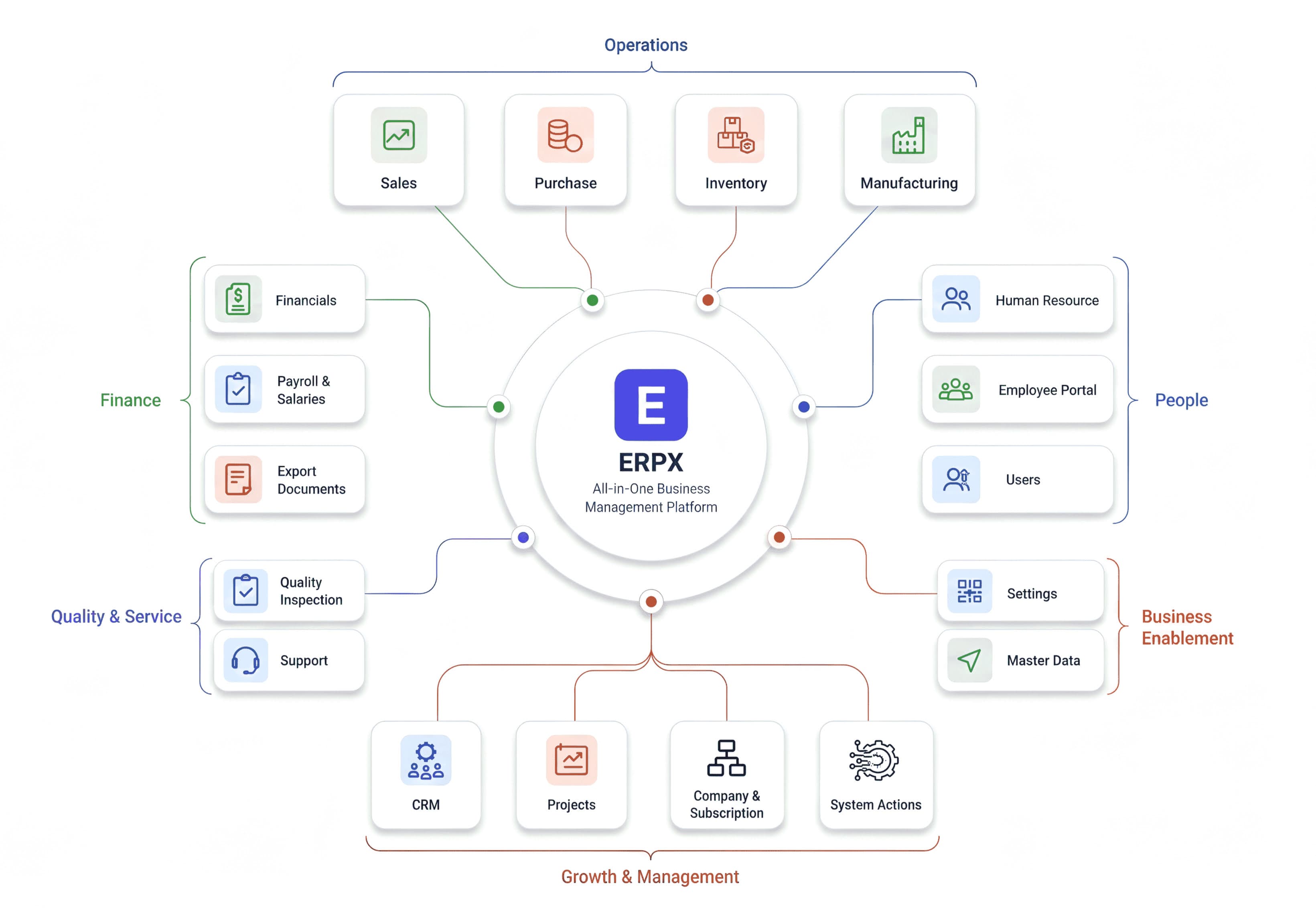
New to ERPX? Start with the Setup guide to configure your organization, then explore the module that matches your role.
What is ERPX?
ERPX replaces disconnected spreadsheets and siloed apps with a single platform where business data is linked in real time:
- Confirm a sale → inventory and receivables update
- Receive a purchase → stock and payables update
- Run payroll → salary slips post into Financials
- Punch attendance (web or ERPX Desktop ) → hours feed leave and pay
Every action is traceable, auditable, and scoped to your organization.
Start here
Configure your company, users, currency, and initial settings before go-live.
Get your first transaction done in under 10 minutes.
Employees, leave, attendance, payroll, lifecycle, performance, and reports.
Browse every module, how they connect, and role-based access patterns.
What’s in the platform
ERPX is organized around the areas shown in the overview above. Open a guide to go deeper:
Operations
| Module | What you do |
|---|---|
| Sales | Customers, quotations, sales orders, deliveries, invoices, payments |
| Purchase | Requests, POs, goods receipts, supplier invoices |
| Inventory | Items, warehouses, stock entries, transfers, valuation |
| Manufacturing | BOM, work orders, job cards, subcontracting, production reports |
Finance & documents
| Module | What you do |
|---|---|
| Financials | Chart of accounts, journals, invoices, bank reconciliation, statements |
| Payroll & Salaries | Structures, payroll entries, slips, benefits (inside HR) |
| Export Documents | Proforma invoices, letters of credit, packing lists, shipment |
People
| Module | What you do |
|---|---|
| Human Resources | Setup, employees, shifts, leave, payroll, lifecycle, performance, reports |
| User Management | Users, roles, permissions, seat allocation |
| Employee Portal | Self-service for employees (leave, documents, and related portal screens) |
Growth, quality & service
| Module | What you do |
|---|---|
| CRM | Leads, opportunities, pipeline, campaigns |
| Projects | Projects, tasks, timesheets, Gantt charts |
| Support | Issues, priorities, support workflows |
| Quality Inspection | Inspection flows tied to manufacturing / inventory where enabled |
Enablement
Company settings, master data, subscription, and system actions live under your organisation setup and admin screens. Start with Organization setup and Configuration.
How work flows across modules
No double entry across systems: one transaction updates the modules that need it.
ERPX Desktop
For attendance check-ins on the shop floor or at the office door, use the Windows desktop app — barcode/QR kiosk mode, offline capture, and auto-sync.
Download: texinnova.com/erpx
Details and how punches land in HR are in the HR overview and Shift & Attendance.
Learn the product
| Guide | Use it when you need to… |
|---|---|
| User Guide | Navigate the UI, dashboard, search, reports, and data import/export |
| API Reference | Integrate with REST APIs and webhooks |
| Integrations | Connect payments, email, and third-party tools |
| FAQ & Troubleshooting | Fix common setup and usage issues |
Why ERPX?
| Feature | ERPX | Traditional ERP |
|---|---|---|
| Setup time | Minutes | Weeks / months |
| Cloud native | ✅ Yes | ❌ Often on-prem |
| Modern UI | ✅ Yes | ⚠️ Frequently outdated |
| Mobile responsive | ✅ Yes | ⚠️ Limited |
| API-first | ✅ Yes | ⚠️ Limited |
| Real-time modules | ✅ Shared data | ⚠️ Separate systems |
| Desktop attendance | ✅ ERPX Desktop | ❌ Rare / add-on |
Need help?
- FAQ & Troubleshooting — /faq
- Book a demo — texinnova.com
- Email — support@texinnova.com